Welcome home, player!
By clicking Continue with Google or Facebook, you agree to G2Play's Terms & Conditions and Privacy Policy, also to NFT Terms & Conditions and NFT Privacy Policy.
New to G2Play?
Sign up now!SteamEpic GamesBattle.netUbisoftgog.comMS Store Rockstar GamesEA AppPlaystation 5Playstation 4Xbox Series S|XXbox OneNintendoMeta QuestAndroidiOSFPSActionAdventure GamesRPG VR GamesStrategy GamesRacingOpen WorldHorrorSimulationSportSurvivalVisual NovelMMOLife SimulatorCasualPlatformerTPSHidden ObjectsAnimeCooperationFightingHack & SlashMusic / SoundtrackPoint & ClickPuzzleStory RichBest-selling Mystery Keys Special EditionsTry to getHidden Robux PackMystery Fortnite SkinsLEGO Mystery KeysMystery Games – by GenreMystery Multi-Key BundleVR Mystery KeysUnder 5 EURUnder 10 EURUnder 50 EURUnder 100 EUROver 100 EUR and moreIngame CurrenciesIngame ItemsGame Top-UpsBoosted AccountsGame BoostingGame top-upsApp & Subscription top-upRoblox ItemsFortnite V-Bucks & AccountsMinecraft CoinsPokemon PokecoinsLeague of Legends RPGTA 5 Cash & AccountsElden Ring RunesClash of Clans GemsMonopoly GO! Dice & StickersArc Raiders Coins & ItemsDelta Force CoinsValorant PointsApex Legends CoinsPUBG UCArena Breakout: Infinite BondsMarvel Rivals LatticesTom Clancy's Rainbow Six SiegeBorderlands 4 MoneyWorld of Warcraft GoldPath of Exile 2 OrbsDiablo IV Gold & ItemsWarframe PlatinumAlbion Online SilverRuneScape - OSRS GoldWhiteout Survival Frost StarsFallout 76 Caps & ItemsAion 2 KinahGenshin Impact CrystalsHonkai: Star Rail Oneiric ShardZenless Zone Zero MonochromeWuthering Waves LuniteArknights: Endfield OrigeometryHonor of Kings TokensMapleStory MesosSolo Leveling: Arise Diamonds7DS: Origin Star MemoryStar Citizen aUECGrowtopia LocksOnce Human Energy LinkWhere Winds Meet Echo BeadsNeverness to Everness RiftcrystalFC 26 Coins & PointsForza Horizon 5 CreditsMadden NFL 26 CoinsMLB The Show 26 StubsGame AccountsEdit Like you Mean it.Gaming ToolsProtect your PCLevel Up to Windows 11Best Productivity ToolsAdobe toolsStay safe onlineCreative toolsPersonal DevelopmentIObit Driver Booster ProCCleaner Advanced SystemCare ProNoPingExpress VPNHMA! Pro VPNNordVPNParallels DesktopCrossOverESET Internet SecurityBitdefender Total SecurityAVASTNorton 360 for GamersWindows HomeWindows ProfessionalWindows Enterprise Windows ServerMore WindowsWindows BundleParallels DesktopVMwareCrossOverEsetBitdefender KasperskyNortonAvastTrend MicroMcAfeeAdGuardF-SecureExpress VPNNordVPNHMA! Pro VPNSurfsharkAdGuard CyberGhost VPNMS Office HomeMS Office ProfessionalMS Office 365 MS Project MS OutlookMS VisioOffice BundleAdobe AcrobatNitro PDFPDFZilla Adobe Creative Cloud Adobe PhotoshopAdobe Substance 3D More AdobeVEGAS Pro CorelDrawWondershare Filmora Affinity SoftwareAbleton LiveNeroVoicemod PROCCleaner IObit Laplink PCmover EaseUS NoPing3DMarkWinZipAOMEIMiniToolAshampooRevo Uninstaller ProNeroPrepaid AccountsXbox LivePlaystation StoreSteam Nintendo eShopValorantRobloxLeague of LegendsWorld of WarcraftRazer GoldLieferandoAmazonAirbnbZalandoIKEAAppleiTunesDiscordTinderNetflixBinanceAztecoGift MeCrypto VoucherBitJem

You may also like
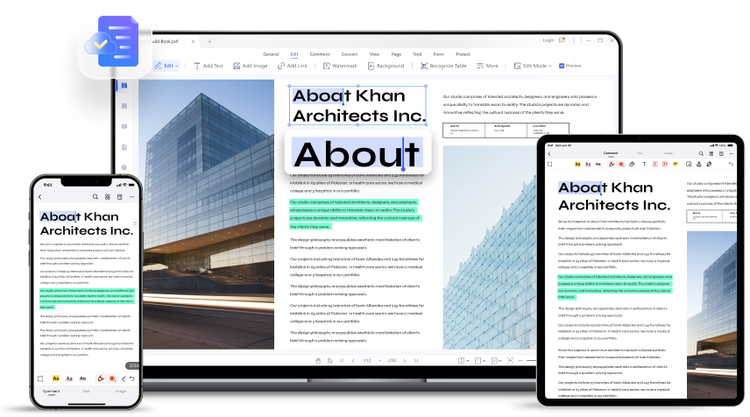
Easy PDF Editor Software - Edit PDF File like Word
An easy-to-use PDF editor for PC and mobile users to edit PDF text, images, forms, pages, and more.
- Edit PDF text effortlessly.
Quickly add/edit text in PDF files. Fix a typo or add a new paragraph in PDF effortlessly.
- Edit text with the same formatting.
- Modify text size, font, color and alignment.
- Built-in spellcheck.
- Add image to PDF and customize it.
With PDFelement, you can add, replace, and move images in PDF documents. Edit images the way you want.
- Rotate and flip images.
- Crop images.
- Change the opacity of images.
- Add watermark to PDF in seconds.
You can insert a watermark into a PDF with text or an image. A unique logo or text watermark on your PDF helps identify ownership and build your brand image.
- Support both text and image watermarks.
- Customize watermark characteristics such as font size, rotation, opacity, position, etc.
- Apply watermarks to specific pages.
- Add hyperlinks to PDF with ease.
Add clickable hyperlinks to easily direct readers to any supplemental information.
- Hyperlink to a specific page.
- Hyperlink to a web page.
- Add a link to open a file or play a video or audio.
- Add page number to PDF.
With PDFelement, you can add a header and footer to display page numbers, dates, etc. It also provides bates numbers for legal documents.
- Add footer and header to PDF.
- Add bates numbers to PDF.
- Change PDF background color.
Give your PDF document a fresh new look by changing its background. PDFelement allows you to add a background color or change the existing background.
- Built-in color picker to choose the color you prefer.
- You can also adjust the opacity, scaling and page range.